Showing posts with label computing. Show all posts

Thursday, May 4, 2017

Rogue AI and Human Ego

In a bout of good conversation with a friend, we ended up asking the question:
How do you hold an artificial intelligence (AI) accountable for its actions?
 "Punishment!" We said; but...
How does one punish an AI?
The same way one would punish a person: Take away something that it cares about.

What does an AI care about such that taking it away will cause a change in behavior?
Why would taking something away cause a change?
What would even motivate an AI in the first place?

"hmmm...." We said...

What if an AI's motivation worked in a completely different way from a human's motivation?
What if the AI's value system was built like an insect hive's? Where no member could even conceive of the idea of performing a "bad" (i.e. independent, self-serving, coming at the cost of another) action?
Does an ant colony ever have a rogue ant problem?
(I think it safe to say that humans have rogue human problems, even without AI.)

Perhaps the rogue AI problem comes from the hubristic assumption that a "good" (i.e. functional, effective, general) AI, needs to be modeled on human intelligence? 

Perhaps, just as a fish doesn't know water, we are blind to our primate sense of fairness and justice, evolved to manage exactly the kind of intelligence we happen to have. Because of this, we can't see an alternative to the idea that a human based intelligence must come with a human based motivational system, including individuality and rule questioning behaviors.

Are we, in fact, creating the control problem by assuming that the intelligence we create should function like our own?

(Kevin Kelly has something to say about this from a slightly different angle:  AI or Alien Intelligence)


Sunday, December 22, 2013

The Essence of Big Data

It seems like the term "Big Data" has come to refer to so many things that it has become more of an aspirational marketing term than a technical one.
In dealing with "big data" projects at work I have come to a definition that seems useful.

Big Data is composed of several systems that work together:

  • The hardware that enables all the other algorithms needed to handle and analyze the data of interest.
  • The algorithms which efficiently load, transform and store data from varied, high volume data flows.
  • The algorithms which retrieve and manage the stored data in a way that allows other algorithms and s/w tools to act on it efficiently.
  • Correlation algorithms which automatically comb through the data looking for data items which are related in ways which might be "interesting" to the end user.
  • The visualization tools which are used to look at the automatically flagged "interesting" subset of data in order to determine if the data is actually useful and if so, how.
  • The actionable information that the end user extracts from the system which he uses to further whatever goals originally justified implementing the big data system.
The hardware, ETL and data storage parts have been addressed by a fairly large number of vendors using proprietary and open source methods. You could say that the data handling platform is becoming a commodity because the movement of data is an undifferentiated requirement for all big data users.

What is still hard is algorithmically filtering the flood of incoming data to pull out the nuggets of interest so that someone can confirm their meaning. The aspects which qualify something as interesting differ from industry to industry and company to company so coming up with a common, turn-key solution may not be possible. So, until that statement is proven false, the seller's market for data scientists will continue.


Sunday, September 23, 2012

InfoSphere Big Data - A Cursory Overview

After a half day of talking with IBM reps about Big Data products and some use cases, here is how I summarized how the pieces fit together.

At time 0 you collect everything and analyze it for correlations to determine which data items are valuable and how they relate to each other (Big Insights platform). Then you build a control model.

Learning from time 0 is used to configure a "real time" strategy for the data analysis and system control.

  • Streams provide real time processing of data "on the wire" - nothing need be stored. The output of this is three fold:
    • "Live" reports for users
    • A data subset to feed to the data warehouse
    • Control signals to feed back to the data collectors to adjust behavior (if needed).
  • Netezza (Data Warehouse) provides a location where "fast" analysis on a "limited" subset of the data can occur.
Hadoop holds everything else so that longer term analysis with full data sets is possible. This could be used to:

  • Adjust the control models
  • Change which data subsets are warehoused 
  • Perform ad hoc deep dive analysis. 
  • Perform regular analysis on data sets which are too large to reasonably warehouse (e.g. raw scan data).

Wednesday, July 25, 2012

The Relationship Between Virtualization, Big Data and Cloud Computing


Virtualization is about taking a single large compute resource and making it act like many smaller resources.


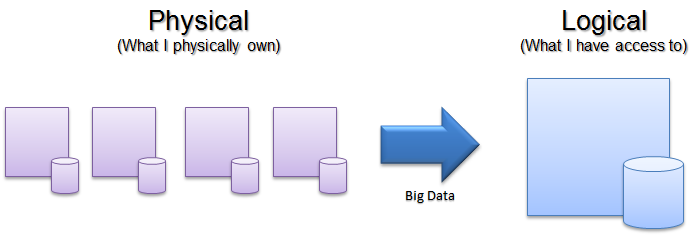
Big Data is about taking many smaller compute (and storage) resources and making them act like one big resource.


Cloud computing is about easily changing my compute and storage resources as needed.


Big Data can leverage cloud computing to scale the size of the "one big" resource as needed.

Wednesday, June 27, 2012

A little bit about Big Data - Hadoop

One of the ways that Big Data of the sort discussed in this last post is implemented is with an open source technology stack called Hadoop.

Hadoop consists of a two main parts:
  • HDFS - Hadoop File System
  • MapReduce infrastructure
These allow data processing jobs to be divided among multiple nodes and then aggregated into a single result. In essence, this constructs a large, parallel computer from many smaller computers - basically the opposite of virtualization.

Schematically, a Hadoop cluster looks like this:


10,000 ft view of how it works

  • The Job Tracker on the master server gets a job
  • The Job Tracker breaks up the job using the map function
    • Basic queuing ensures that any one node is not overloaded with tasks
    • The are tasks preferentially distributed to the nodes nearest the data on which the task must operate to minimize file transfer overhead*.
      • nearest = same node as the data resides.
      • next nearest = different node but behind the same switch (so that data transfer is localized to that network segment).
  • The Job Tracker gets status for all tasks via the Task Trackers as they run. 
    • If a node stops reporting, the Job Tracker will redistribute that node's tasks to another node.
  • When all tasks are complete for a job, the Job Tracker has the nodes execute the reduce function to generate a single result from the tasks' output.
  • The final output may then be used by other applications directly or as the input to another MapReduce iteration.

I am certain that I missed almost every important detail in terms of the actual engineering implementation of a Hadoop cluster. But for those who just need a cursory understanding of the technology in order to make sufficient sense of what engineering is actually talking about to sanity check proposals,  I hope this hits the mark.

---------------------------------------------------------------------------------------------------
* HDFS and the awareness of data's physical location is very important in dealing with large data.
To make compute and storage capacity scale linearly with cost, the data must be spread around all the nodes in the cluster and a record kept of where all the data actually is. It can't be kept centrally or data transfer becomes a serious bottleneck to computational performance. I.e. it could take longer to move the data to a compute node over a network than it takes to actually process it. 
This distribution is managed by HDFS.

HDFS holds and replicates data in the system in order to minimize the chance of a bottleneck. It does this by keeping at least 3 copies of the data:

  • an original
  • a copy on another node behind the same switch as the original
  • a copy on another node on a different switch from the original

This replication attempts to strike a balance between:

  • keeping enough copies of the data to minimize the queue size on each node (to ensure timely completion of jobs) and to ensure robust execution despite failed tasks on dead nodes 
-and-
  • reducing the total storage capacity of the system by duplicating data.

Thursday, June 21, 2012

A little bit about Big Data

The inspection tools that I work with are capable of churning out enormous amounts of data - on the order of terabytes an hour. To handle that data volume, we have done what every company did (up until now) which was sample from the data and reformat it to fit into a gigabyte sized database. This lets the data be accessed for useful analyses but creates a problem in that much of the data is actually lost, ultimately limiting what can be learned.

This is traditional data processing.

To store and handle more data, we swap out the existing hardware with bigger (read: more expensive) hardware. This works only up to a point as the cost of bigger h/w does not rise linearly with capacity. So you reach a limit to what is cost effective pretty quickly.

Schematically it looks something like this:

Several data sources structure the data and put it into a database. Programs running on the compute resources access the data from the database and provide some analysis. Scaling the system means getting bigger h/w.

Big Data changes how this can be done.

At its heart, Big Data is about making the data storage size and computing power scale in a linear way with cost. This is done using a few technologies which I will describe in more detail later.

Schematically it looks something like this:

One system coordinates the actions of many nodes in order to generate a desired computing result. Each node contains both compute and storage.
The entire system works in the same basic way regardless of how many nodes are present. So if more data storage or more computing power is required it can be added by provisioning more nodes instead of replacing the entire system with larger nodes. This makes it easy for a company to scale its costs with actual business volume or to handle burst loads via a hybrid cloud approach (i.e. provisioning additional nodes on demand as an IaaS offering) to avoid large capital expenditures due to over provisioning.

Through this architecture, Big Data brings significant change to the limits of how much data can be handled in a timely manner. IBM has a great summary of this principle in its "three Vs".

  1. Volume : Petabytes instead of terabytes.
  2. Velocity : Analyzed in seconds rather than in minutes, hours or days.
  3. Variety : Coming from many sources, including unstructured data sources (i.e. things that don't fit into a relational database very well).
So, instead of throwing away most of the inspector data as we do today, we could keep the data and build a system at reasonable cost which could actually process it. With hard work on new algorithms which could take advantage of the new data would come new insights into the phenomena behind the data.
Not trivial but newly possible.


Saturday, February 4, 2012

Cloud Computing, Virtualization, IaaS, PaaS and SaaS - Part 2

In part one of this post, I looked in to the question of why cloud computing is important. In this post, I will look into the question of what cloud computing is.

NIST's definition of cloud computing gives a useful model for deciding what is and is not a cloud deployment:
 "cloud computing is a model for enabling ubiquitous, convenient, on-demand network access to a shared pool of configurable computing resources (e.g., networks, servers, storage, applications and services) that can be rapidly provisioned and released with minimal management effort or service provider interaction."

But to understand what "the cloud" is really made up of, it helps to look at how cloud computing is packaged and sold.

  • Infrastructure as a Service (IaaS)
  • Platform as a Service (PaaS)
  • Software as a Service (SaaS)

Infrastructure as a Service (Iaas)
In this cloud offering, the seller provisions virtualized compute, network and storage upon which the buyer installs his own operating system and software. This is most easily thought of as buying bare computers and storage onto which your own IT dept will put everything required for your specific uses.
A few major vendors who offer these products are: Amazon Web Services, RackSpace and AT&T Synaptic Hosting.

Virtualization software is key to making IaaS feasible. Without virtualization, physical hardware would need to be provisioned for each customer. This would make it prohibitively expensive to quickly provision, re-provision and scale resources to meet customer needs.
The major virtualization s/w vendors include VMWare (ESX), Microsoft (HyperV) and an open source virtualization solution Xen.

More on virtualization in another post.

Platform as a Service (Paas)
In the platform level cloud offering, the seller provisions some combination of operating system, middleware and runtime packages which enable the buyer to develop and run applications of their choosing. This can be thought of as buying access to services which enable programs to easily access the resources they need to run.
Vendors provide a variety of offerings in this space. A few major offerings are below:

  • Google App Engine provides a number of runtime environments for web application developers.
  • Amazon Simple Storage Service (S3) provides file based storage to any application which needs it while Amazon Elastic Block Store (EBS) provides block level storage for applications the need direct storage access (like DBs).
  • Microsoft Azure provides access to a few runtime envrionments,  SQL DB services for applications which need DB services and the virtual network fabric required to link together multiple server's services.
Software as a Service (Saas)
In this level of cloud offering, the seller provides the buyer with access to end applications while hiding the infrastructure, middleware and runtime components. Pretty much every time you hear about a "web application" being offered by a company, you are seeing a SaaS product.
There are probably thousands of SaaS offerings available so covering any significant fraction of the space here is futile. But here are a few examples of SaaS offerings:
  • Web email - from google, Yahoo, etc
  • Office 365 and Google Apps - On line productivity apps for creating, accessing and collaborating with others on a variety of document types (word processing, presentations, spreadsheets, picture editing, etc).
  • Sustainable Supply Chain (SSC) - Supply chain survey management for corporate social responsibility reporting from CSRware.
  • Facebook and Google + - public social networking tools for keeping tabs on your friends around the world.
  • Socialcast, Clearvale , Jive and Spigit -  Enterprise social networking tools for keeping abreast of news and status, smoothing workflow, fostering collaboration and spurring idea generation in a corporate context.
One additional consideration is which user base a cloud deployment is intended to serve. This leads to the ideas of: Private, Public and Hybrid Clouds

  • Private cloud = services and (often hardware) are strictly for a single company's use. Frequently this implies that the company consuming the services will deploy the cloud services on hardware behind their corporate firewall.
  • Public cloud = services are available for all users anywhere. Though users may need to pay for services... This is the context in which most people experience the cloud because of the heavy reliance start-ups offering SaaS products have on public cloud services.
  • Hybrid cloud = multiple cloud systems connected in such a way as to allow programs and data to be easily moved between private to public clouds.

Tuesday, January 31, 2012

Cloud Computing, Virtualization, IaaS, PaaS and SaaS - Part 1

What is cloud computing and why is it important?

On the question of importance, cloud computing addresses several business problems.

Perhaps the most mundane problem that cloud computing addresses is one of cost for getting applications up and keeping them running.

  • Availability 
    • Because of the underlying technology used in cloud computing (Virtualization - more on this next post.) it becomes relatively easy to implement failover and high availability for servers. This makes the customer experience better (fewer interruptions) and allows more routes to addressing business critical applications (lowers barrier to entry on some enterprise applications).
  • Application deployment & maintenance 
    • Depending on the level of the cloud you engage at (Infrastructure, Platform or Software - more on this next post), the level of IT expertise required to use the applications / services you want can be greatly reduced. Software patching, upgrades, hardware provisioning and maintenance is left to the cloud providers who have this expertise on staff.
These "mundane" aspects of cloud computing enable significantly less mundane capabilities. The most immediate of which are the new business models that become feasible.
  • Software start ups galore
    • Because compute power can be purchased on-demand and in relatively small units, capital costs for starting a software company are significantly reduced. This enables more players to try more things in search of the next big thing.
  • F2P (Free to Play), Freemiums and ad-driven businesses
    • Because the marginal cost of adding users to a centralized s/w application can be nearly zero when deployed in a dynamically scalable infrastructure such as the cloud provides, companies can explore business models that "give away" software, or more precisely: give away access to software, while closely tracking and tailoring the user experience more easily. This leads to businesses that thrive on micro transactions within the software or on ad revenue instead of from sales of the software itself.
  • On-line special events
    • Relatively low cost and rapid provisioning of compute, network and storage resources allows for companies to generate increased community engagement or media attention by using this burst capacity to host periodic special events. For a small fraction of the cost of buying and setting up the h/w and software required to gain this capacity, the same buzz generating potential can be realized.
  • Mobile
    • By using the relatively limited compute power of networked mobile devices to drive the user interface and pushing the computationally intensive tasks to servers in the cloud, the capabilities of mobile devices become nearly unlimited. This creates a new class of applications (e.g. voice recognition, navigation, etc) for entrepreneurs to explore and market, driving sales of mobile computing hardware (e.g. smart phones and tablets) or of the applications (as apps or as services) themselves.
  • Distributed work force, virtual desktops and collaboration
    • Because public cloud resources can be accessed from any internet connected device and data storage is easily centralized, the cloud makes it more feasible than ever to provision specialized applications to anyone, anywhere, to keep company data centralized and provide tools by which physically separated groups can easily interact and exchange information in real time in order to improve productivity.
As Corporate Social Responsibility (CSR) and sustainability concerns increase, the "green" aspects of cloud computing also become more important.

  • Economies of scale in "green" data centers may mean that renting capacity via "the cloud" is greener than you can afford on your own.  
    • Making an efficient data center requires high up front capital and expertise costs. Considerations like the ones below are more affordable by large businesses or by dedicated cloud hosting companies where the risk associated with the capital costs are more acceptable for the long term return.
      • efficient server h/w
      • low energy and passive cooling strategies
      • occupancy based lighting, energy efficient lighting fixtures and daylighting strategies
      • green power purchase agreements
      • on-site generation via renewables (e.g. co-gen, bio-fuel based fuel cells, PV, Solar thermal, etc.)

Next time some details about the the "what" part of the question.